
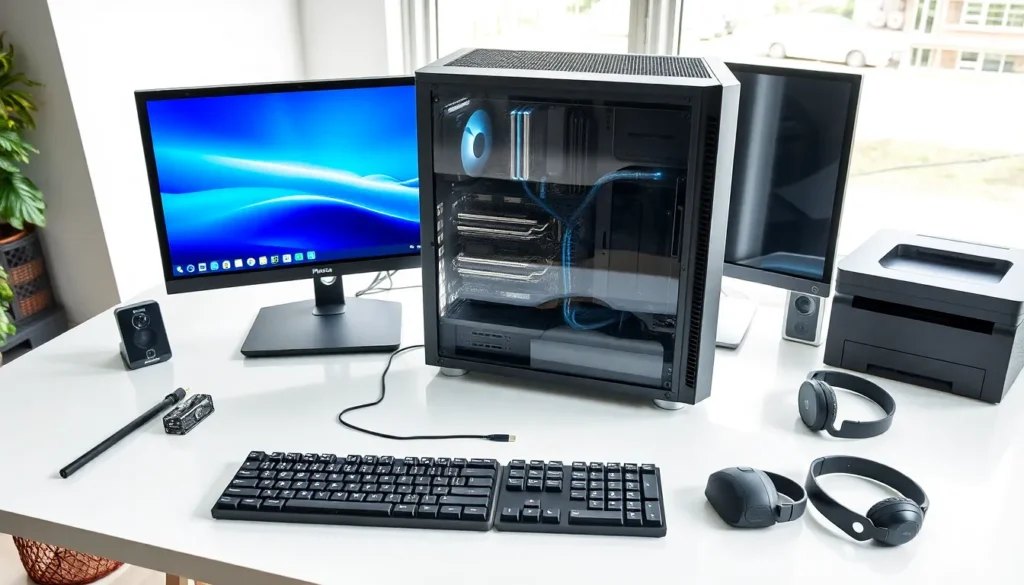
Hardware examples include every physical component that makes a computer work. From the CPU inside a desktop to the keyboard under your fingertips, hardware forms the foundation of modern computing. This guide breaks down the main types of computer hardware, explains what each component does, and provides clear examples you can reference. Whether someone is building their first PC or simply wants to understand what’s inside their laptop, this article covers the essential hardware categories in plain language.
Table of Contents
ToggleKey Takeaways
- Hardware examples include all physical computer components, from CPUs and RAM to keyboards and monitors.
- Internal hardware like the CPU, motherboard, GPU, and storage devices handles processing, memory, and data storage inside the computer case.
- SSDs offer faster performance than HDDs, making them ideal for operating systems and frequently used programs.
- Input devices such as keyboards, mice, and webcams send commands to the computer, while output devices like monitors and printers display results.
- Understanding different hardware examples helps you make smarter decisions about computer repairs, upgrades, and purchases.
What Is Computer Hardware?
Computer hardware refers to the physical parts of a computer system. These are the components you can touch, hold, and see. Hardware examples range from tiny microchips to large monitors and printers.
Hardware differs from software in one key way: software consists of programs and data stored digitally, while hardware exists as tangible equipment. A computer needs both to function. The operating system (software) tells the processor (hardware) what to do. Neither works alone.
Computer hardware falls into two main categories:
- Internal hardware: Components located inside the computer case
- External hardware: Devices connected to the computer from outside
Each piece of hardware serves a specific purpose. Some components process information. Others store data. Some let users interact with the machine, while others display results. Understanding these hardware examples helps people make better decisions about repairs, upgrades, and purchases.
The quality and capability of hardware directly affects computer performance. A faster processor handles more tasks. More RAM allows multiple programs to run smoothly. Better graphics cards produce sharper images. These hardware choices determine what a computer can accomplish.
Internal Hardware Components
Internal hardware sits inside the computer case. These components handle the core functions of computing: processing, memory, and storage. Most users never see internal hardware unless they open their computer for repairs or upgrades.
Processing and Memory Devices
The Central Processing Unit (CPU) acts as the brain of any computer. It executes instructions, performs calculations, and manages data flow between components. Popular CPU hardware examples include Intel Core processors and AMD Ryzen chips. CPU speed is measured in gigahertz (GHz), and higher numbers generally mean faster performance.
The motherboard connects all internal hardware together. It provides pathways for data to travel between the CPU, memory, storage, and other components. Every piece of internal hardware plugs into or attaches to the motherboard.
Random Access Memory (RAM) stores data temporarily while the computer runs. When someone opens a program, the computer loads it into RAM for quick access. More RAM means the system can handle more programs at once. Common RAM hardware examples include DDR4 and DDR5 memory modules. Most modern computers use between 8GB and 32GB of RAM.
The Graphics Processing Unit (GPU) handles visual output. It renders images, videos, and animations. Gamers and video editors rely on powerful GPUs. NVIDIA GeForce and AMD Radeon cards represent popular GPU hardware examples. Some CPUs include integrated graphics, while dedicated graphics cards offer better performance.
Storage Devices
Storage devices hold data permanently, even when the computer powers off. Two main types of storage hardware exist today.
Hard Disk Drives (HDDs) use spinning magnetic platters to store data. They offer large storage capacities at lower prices. A typical HDD might hold 1TB to 4TB of data. But, HDDs run slower than newer alternatives because they rely on moving parts.
Solid State Drives (SSDs) store data on flash memory chips. They contain no moving parts, which makes them faster, quieter, and more durable than HDDs. An SSD can load programs and boot the operating system in seconds. NVMe SSDs represent the fastest storage hardware examples available today.
Many users combine both storage types. They install the operating system and frequently used programs on an SSD for speed, then store large files like photos and videos on an HDD for capacity.
External Hardware Devices
External hardware connects to the computer from outside the case. These devices let users interact with the system and receive output. Most external hardware examples plug in through USB, HDMI, or wireless connections.
Input Devices
Input devices send data and commands into the computer. They translate human actions into digital signals the system can process.
The keyboard remains the most common input device. Users type text, enter commands, and trigger shortcuts through keyboards. Mechanical keyboards, membrane keyboards, and wireless models all serve as hardware examples in this category.
The mouse controls the cursor on screen. It allows users to click, drag, and select items. Optical mice use light sensors, while older models used rolling balls. Gaming mice often include extra buttons and adjustable sensitivity.
Scanners convert physical documents and images into digital files. Flatbed scanners work well for photos and papers. Document scanners handle large volumes quickly.
Microphones capture audio input. They enable voice calls, recording, and voice commands. USB microphones and headset mics represent common hardware examples for audio input.
Webcams record video and capture images. They’ve become essential for video conferencing. Most laptops include built-in webcams, while desktop users add external ones.
Output Devices
Output devices display or produce results from the computer. They convert digital data into forms humans can perceive.
Monitors display visual output. They show everything from text documents to high-definition video. LED monitors, LCD screens, and OLED displays represent different hardware examples. Screen size, resolution, and refresh rate vary by model and purpose.
Printers produce physical copies of digital files. Inkjet printers work well for photos. Laser printers excel at text documents and high-volume printing. All-in-one printers combine printing, scanning, and copying.
Speakers and headphones deliver audio output. They play music, sound effects, system alerts, and voice from calls. Quality ranges from basic built-in speakers to surround sound systems.
Projectors display images on large surfaces. They suit presentations, home theaters, and classrooms. Projectors connect through HDMI or wireless protocols.